


Overview
NotebookLM takes sources one at a time, through a file picker. Source LM takes the batch.
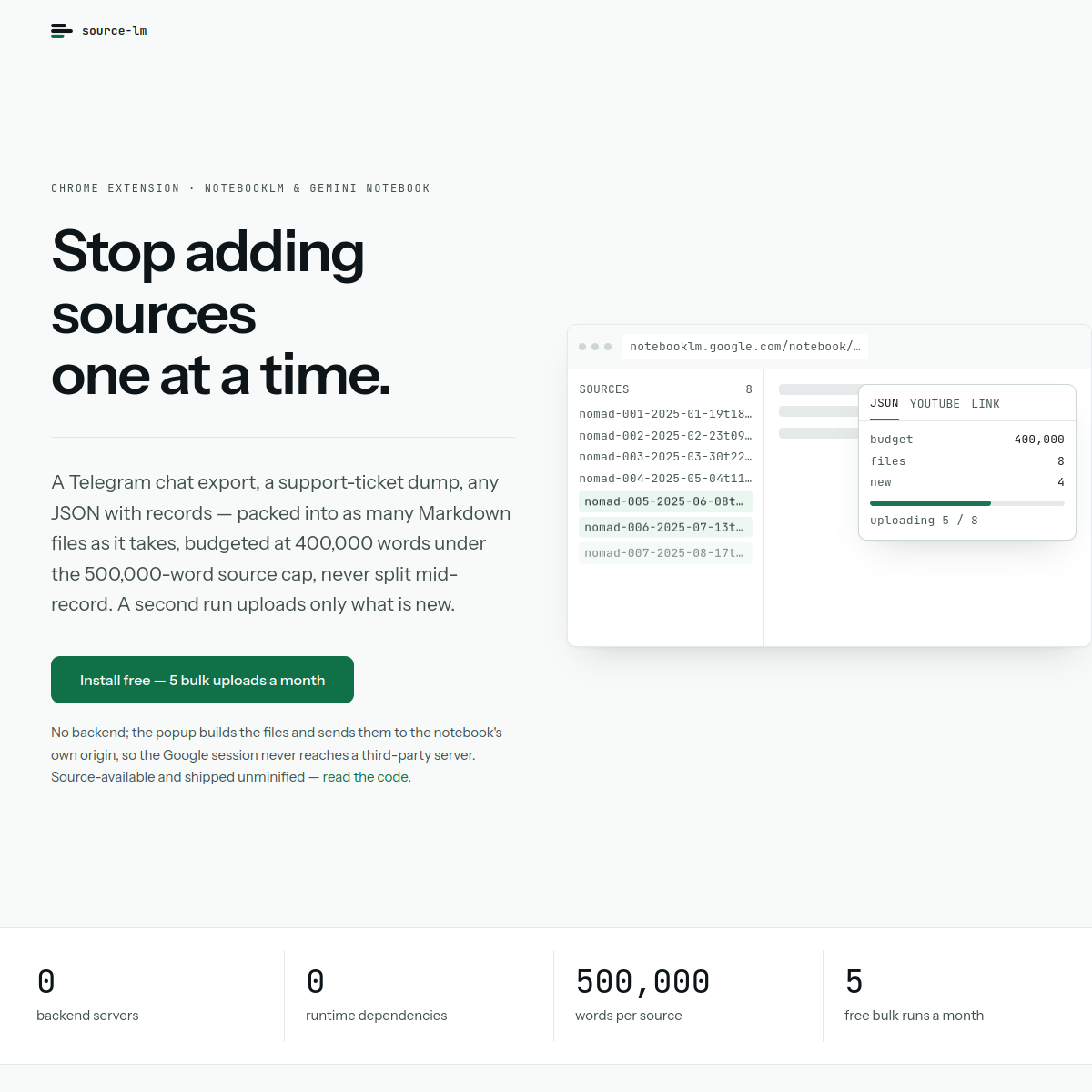
Pick a .json export and Preview shows exactly how it will be packed: records are budgeted under NotebookLM's 500,000-word per-source cap and never split across files. Upload sends them straight into the notebook tab you have open. Re-run it later and only the new records go up — the cursor is parsed out of the source names already in the notebook, so there is no local state to corrupt.
YouTube is the other half. "Add to notebook" buttons are injected into YouTube's own UI on watch pages, playlist panels and playlist headers; one click turns a playlist or channel into one source per video, optionally with the top comment threads as a second Markdown source. Web pages work too: paste one link or a whole list, or capture the page you are on as Markdown when NotebookLM cannot fetch it itself (login-walled or JS-rendered). On the notebook page it also adds a source filter, duplicate selection, batch deletion and a broken-source repair flow.
Nothing is downloaded. Files are built as File objects in memory in the popup and sent through the notebook page's own upload endpoint — primarily Google's private batchexecute RPC, with automatic fallback to DOM injection if that call fails, because the two break for different reasons. Manifest V3, TypeScript, zero runtime dependencies, shipped unminified. There is no backend of ours: no proxy, no telemetry, no account, and your Google session cookies never leave the browser.
Free covers single sources — a link, the current page, one video — plus 5 bulk actions a month. Pro is $29 once, not a subscription, for unlimited bulk actions. Source-available under PolyForm Noncommercial; not affiliated with Google.
A Chrome extension that adds sources to NotebookLM and Gemini Notebook in batches: a JSON export becomes Markdown files, a YouTube playlist becomes one source per video, a list of links becomes a list of sources. Nothing is written to disk and there is no backend — files are built in the browser.
Sources behind this listingSee source links, recorded dates and owner corrections.
Observed facts come from public pages. Founder-edited facts are supplied by the verified owner. AI-inferred facts are model interpretations; derived facts are calculated from other data. A source link lets you check the current page. It does not guarantee the fact is still current.
Dates show when a record was saved. Some older records use the listing’s update date; they are not proof of a fresh check. Missing source records are shown explicitly.
- TaglineBulk sources into NotebookLM, straight from the browser
- Founder-editedDate not recordedSource link unavailable
- DescriptionNotebookLM takes sources one at a time, through a file picker. Source LM takes the batch. Pick a .json export and Preview shows exactly how it will be packed: records are budge...
- Founder-editedDate not recordedSource link unavailable
- Starting price$29 one-time
- Founder-editedDate not recordedSource link unavailable
- Free planYes
- Founder-editedDate not recordedSource link unavailable
- Free trialNo
- Founder-editedDate not recordedSource link unavailable
- Pricing modellifetime
- Founder-editedRecorded Source link unavailable
- IntegrationsGitHub, Google Workspace, Telegram
- Founder-editedDate not recordedSource link unavailable
- PlatformsChrome Extension
- ObservedRecorded Source: source-lm.com
- Open sourceYes
- ObservedRecorded Source: source-lm.com
- Company locationremote
- Founder-editedDate not recordedSource link unavailable
- Plan: FreeFree
- Founder-editedRecorded Source link unavailable
- Plan: Pro — $29 one-timePrice not stated
- Founder-editedRecorded Source link unavailable
- SummaryA Chrome extension that adds sources to NotebookLM and Gemini Notebook in batches: a JSON export becomes Markdown files, a YouTube playlist becomes one source per video, a list ...
- Founder-editedDate not recordedSource link unavailable
Pricing
- 5 bulk actions a month, resets on the 1st
- Single sources — one page, link or video — always free
- Deleting and managing sources always free
- No account and no sign-in
- One-time $29, no subscription and no renewal
- Unlimited bulk runs
- Licence key checked against the payment provider only
- No account to manage, key lives in your browser profile
Key Features
- Batch JSON → Markdown sources, packed under the 500,000-word per-source cap, records never split
- Incremental re-runs: only new records upload, reconciled from source names already in the notebook
- YouTube playlist, channel or single video → one source per video, from buttons inside YouTube's own UI
- Top comment threads as an optional second Markdown source
- Link lists and current-page capture for pages NotebookLM cannot fetch itself
- Source filter, duplicate selection, batch delete and broken-source repair on the notebook page
- No disk writes, no backend, no account — files built in memory, sent to the notebook's own origin
Who Is It For
Individuals and small teams who utilize NotebookLM for note-taking and knowledge management, particularly those engaged in content curation or research.
Anyone feeding NotebookLM more than a handful of sources: JSON exports, YouTube playlists or channels, and long link lists that the file picker makes tedious.
Not a NotebookLM replacement and not a scraper. It adds sources to a notebook you already have open; it does not query, summarise or export anything back out.
Strengths & Weaknesses
Classification
Alternatives to Source LM
Community
No comments yet. Be the first to share your experience.