

Most founders hear "SEO" and immediately think about backlinks. Get links, rank higher. That's the narrative. And backlinks do matter - we've written about how do-follow vs no-follow links actually work if you want the full picture. But get the on-page fundamentals right first.
Backlinks from other sites point at your pages. If those pages are a mess - confusing titles, duplicate headings, no internal structure, images with no alt text - you're building on sand. On-page SEO is the foundation. It's also the part you control right now, with no budget.
According to a 2026 analysis by Backlynk (source), on-page factors account for roughly 30-40% of Google's ranking decision. The rest is off-page signals - links, brand authority, user signals. That's a big slice, and it's yours to get right.
This guide walks through the on-page elements that matter most for a new SaaS or tool, in priority order.
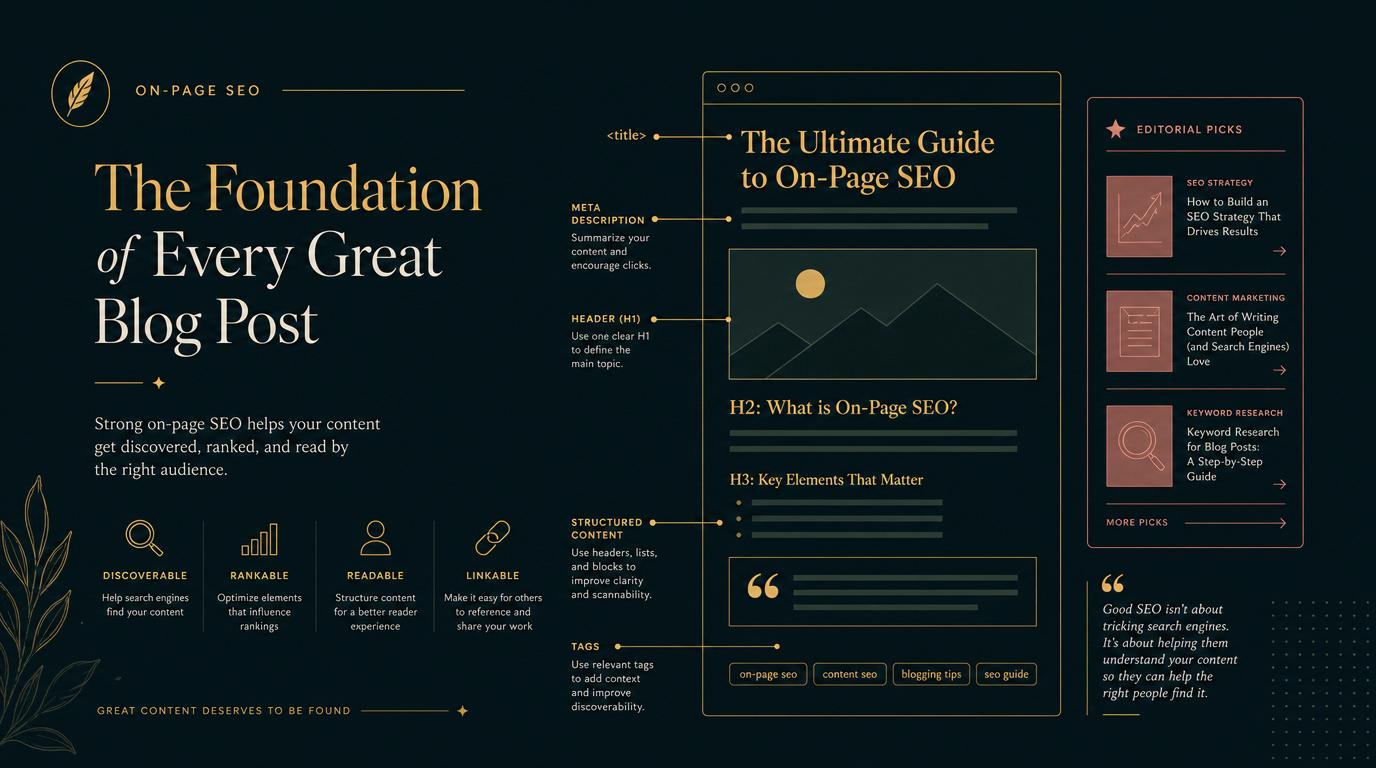
1. Title tags: the single most impactful thing you control
Your title tag is the text that shows up as the blue link in Google. It's the first thing a searcher sees. It also tells Google what your page is about.
Get it wrong, and Google might rewrite it. In fact, Google now rewrites approximately 61% of title tags it encounters in search results, up from 33% in 2021 (Zyppy analysis, via Backlynk). The most common trigger is a mismatch between the title tag and the actual content of the page.
What good title tags look like for founders:
- Keep it under 60 characters. Google truncates longer titles in search results. You lose the end of your own message.
- Include your primary keyword naturally. Don't stuff it - write for the human first. But the keyword should be in there, ideally near the front.
- Match what the page actually covers. If your title says "Best invoicing app for freelancers" but the page is a generic homepage, Google will rewrite it.
- Every page needs a unique title. Templated titles like "My App - Home""My App - Pricing""My App - Features" are wasted opportunities.
One common founder mistake: putting the brand name first. Unless your brand is more recognizable than the topic ("Apple iPhone" vs "iPhone"), put the keyword or benefit first and the brand after a dash or pipe. "Invoice automation for freelancers | AppName" beats "AppName | Invoice Automation".
2. One H1 per page, and make it count
The H1 heading is the main visible heading on a page. There should be exactly one per page. Not zero, not three.
Google uses the H1 to understand what a page is about. It's not a ranking signal with much weight on its own, but it compounds with the title tag and content to form a consistent signal. If your H1 says something completely different from your title tag, you're sending mixed messages.
The practical rule: your H1 should match the intent of the title tag, but it doesn't need to be word-for-word identical. It can be slightly longer or phrased differently for readability. What it can't be is absent, duplicated across pages, or completely off-topic.
Below the H1, use H2s and H3s to structure the page. This helps readers scan. It also helps Google understand the hierarchy of your content and which subtopics belong to the main topic.
3. Meta descriptions: they don't rank you, but they get you clicked
Meta descriptions aren't a direct ranking factor. Google confirmed this years ago. But they control the short summary text that appears below your title in search results, and that text influences whether someone clicks your link or the one below it.
Write them like ad copy, not like a Wikipedia summary:
- Target 150-155 characters (up to 160 before Google truncates).
- Include the primary keyword - Google bolds it when it matches the search query.
- Tell the reader what they'll get if they click. Benefit-led, not feature-led.
- Make it specific. "A complete guide to invoicing" is generic. "How freelancers track billable hours and get paid faster with one tool" is specific.
Every page needs a unique meta description. If you don't write one, Google picks text from the page, usually a random paragraph that might not represent the page well.
4. URL structure: clean, lowercase, readable
Your URLs are crawled, indexed, and shown in search results. Clean URLs look trustworthy and communicate context.
The rules are simple:
- Use hyphens, not underscores (
/how-it-worksnot/how_it_works). - Keep them short and descriptive.
/blog/invoicing-tips-for-freelancersbeats/blog/article?id=2847. - Lowercase only. URLs are case-sensitive; uppercase variants create duplicate URL problems.
- Remove filler words when you can (
/saas-pricing-guidebeats/a-guide-to-the-best-saas-pricing-strategies).
For product or app pages, avoid putting dates in URLs unless the content is inherently time-sensitive (news, events). Blog posts can use dates if your publishing strategy benefits from it, but evergreen guides usually rank better without them.
Once a URL is indexed, don't change it without a proper 301 redirect. Changing URLs loses the link equity those pages have accumulated.
5. Internal linking: the most underrated on-page lever
Internal links are links from one page on your site to another page on your site. They're one of the highest-impact things a solo founder can do, and almost no one does them well.
Why they matter:
- They tell Google which pages are important (the more internal links a page gets, the more weight Google assigns it).
- They help Google discover pages it might not have found otherwise.
- They keep visitors on your site longer, reading more.
For a new SaaS site, a simple internal linking strategy looks like this: every blog post links to at least two other relevant posts. Your homepage links to your most important product pages. Your product pages cross-link where relevant. Your most important "cornerstone" pages - the ones you most want to rank - should get the most internal links.
Orphaned pages (pages with no internal links pointing at them) are often under-ranked or barely crawled. Don't let important pages sit in isolation.
One concrete step today: a free, honest, do-follow listing on directree. Paste a URL, get a structured listing in about 30 seconds - and a do-follow backlink pointing back at your site.
Submit a tool6. Image alt text: small detail, real impact
Every image on your site should have an alt attribute that describes what's in the image. Alt text serves three purposes:
- Accessibility - screen readers use it for visually impaired visitors.
- Google image indexing - alt text is how Google understands your images.
- Contextual signals - it contributes modestly to on-page keyword relevance.
Alt text should be descriptive and natural. "Screenshot of the invoice dashboard showing unpaid invoices" is good. "invoice software best free tool 2026 SEO" is keyword stuffing and counterproductive.
For decorative images that add no content meaning, use an empty alt attribute (alt=""). This tells screen readers to skip it.
7. Core Web Vitals: page speed is a ranking factor
Google officially confirmed Core Web Vitals as a ranking factor in 2021. The key metrics for new sites to watch:
- LCP (Largest Contentful Paint): How fast the main content loads. Under 2.5 seconds is good. Over 4 seconds is a problem.
- CLS (Cumulative Layout Shift): How much the page jumps around as it loads (images popping in, ads shifting content). Under 0.1 is good.
- INP (Interaction to Next Paint): How responsive the page is to clicks and taps. Under 200ms is good.
You can check all three for free with Google PageSpeed Insights or Google Search Console's Core Web Vitals report.
For most SaaS sites built on modern frameworks (Next.js, Nuxt, Astro), LCP and CLS are manageable if you're thoughtful about image optimization and don't load huge JavaScript bundles upfront. The most common culprits are unoptimized hero images, fonts that cause layout shifts, and third-party scripts loading synchronously.
Common mistakes founders make (and how to avoid them)
Duplicating title tags and H1s across pages. If your homepage, your "Features" page, and your "Pricing" page all have nearly identical titles, Google doesn't know what any of them is specifically about. Each page needs a clear, unique purpose and title.
Ignoring the pages that aren't blog posts. Your homepage, your pricing page, and your key landing pages matter more than any blog post. SEO best practices apply to every indexed page, not just content.
Stuffing keywords into alt text, headings, and meta descriptions. Google's spam detection catches this. Write naturally. One clear keyword signal per element is plenty.
Not checking if pages are indexed. Open Google Search Console, go to the URL inspection tool, paste in a page URL, and check if it's indexed. It sounds obvious, but a lot of new sites have indexing issues they don't know about: blocked by robots.txt, marked noindex by mistake, or just not yet crawled.
Treating SEO as a one-time setup. On-page SEO should be part of how you build new pages, not a retrofit exercise months later. Setting it up right the first time is far less work than auditing and fixing 50 pages later.
Where directree fits in your on-page picture
Directree isn't a replacement for your own site's SEO. It's a complement. When you submit your tool to directree, your listing page gets:
- A do-follow backlink pointing at your site (for the domain authority side of things - more on that in our backlinks guide).
- A structured, factual listing that clearly labels what's observed vs AI-inferred vs founder-edited. No fake precision scores.
- A presence in the directree directory that shows up in relevant searches and, increasingly, in AI search answers, which is its own growing channel (see our GEO guide).
Getting listed takes about 30 seconds. The listing is free. It's a low-effort step that covers the off-page signal side while you do the on-page work described above.
To get the most from your listing, claim it as the founder and fill in your own description, pricing, and key features. That "Founder-edited" label tells both searchers and AI systems that the information is verified, which matters more as AI search becomes more prominent.
FAQ
Does meta description affect my Google ranking?
No, not directly. Google confirmed that meta descriptions aren't a ranking signal. But they affect click-through rate, and CTR is an indirect signal that influences rankings over time. Write them for humans first.
How many keywords should I target per page?
One primary keyword per page is the right mental model. You'll naturally mention related terms in the body, which is fine. But optimizing one page for five different target keywords usually means it ranks weakly for all of them instead of strongly for one.
Should I use keywords in my URL?
Yes, where it's natural and clean. /how-to-set-up-invoicing is better than /page-47. But don't force it or make URLs unreadably long just to fit in keywords.
How often should I audit on-page SEO?
For a new site, audit every new page before publishing (use it as a pre-publish checklist). For existing pages, a quarterly review is reasonable. Check for any pages that picked up impressions but have poor CTR, which usually signals a title or meta issue worth fixing.
Does page speed matter as much as people say?
Yes, but with nuance. Very slow pages (4+ second LCP) are clearly penalized. But obsessing over going from 85 to 100 on PageSpeed Insights when your competitor has stronger backlinks and better content isn't the best use of time. Fix obvious problems, don't chase perfection.
On-page SEO won't make a brand-new site rank overnight. Nothing will - be skeptical of anyone who says otherwise. But getting the fundamentals right means that when you do start building backlinks and publishing content, that effort compounds on a solid foundation instead of leaking away. Start here first.